Protected work
This case study is password protected. Enter the password to continue.
Have a copy of my resume? You'll find the password on it.

Setting customers up for success in their first 30 days
Customers were opening Acorns Checking accounts and walking away. No engagement, no activation, no retention.
Team: Product Design Lead (myself), Product Manager, Engineering Manager, Data Analyst.
I partnered with a PM to find out why. We interviewed two groups: customers who had gone dormant, and customers who were thriving. The pattern was clear. Successful users had all completed a handful of key behaviors early on. The data team confirmed it: those early actions were directly tied to long-term engagement.
I designed a widget to appear at key touch points in the banking experience, encouraging these behaviors in simple, actionable ways. This was shown to users who had recently opened Checking accounts for 30 days, or until they completed all the actions.
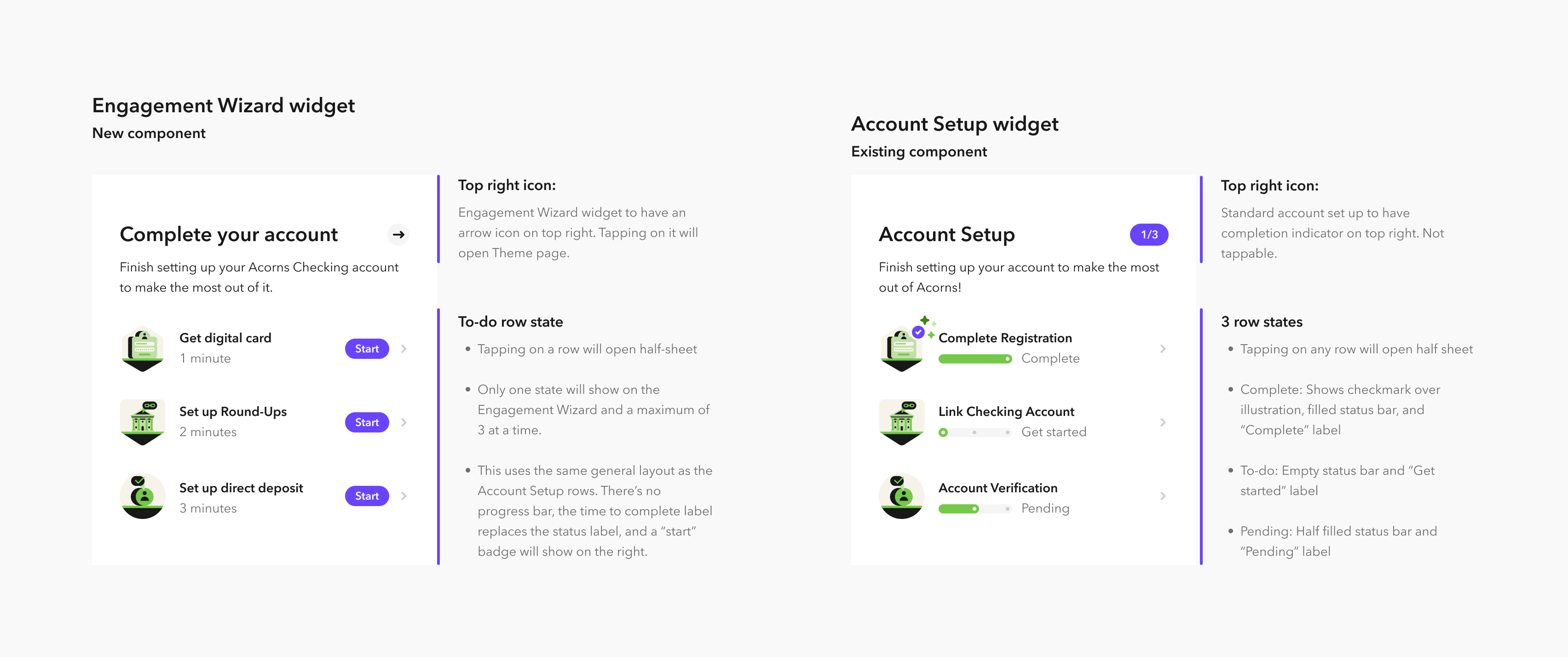
Initially, we thought a new component would be needed, but after consulting with the design team, we determined that an existing widget used by the growth team could be adapted with a few adjustments. I partnered closely with a design system engineer to document the updated component variables for this project (pictured below).
We saw an increase in customers completing all these engagement driving actions. Most notably, Direct deposit sign-ups saw a meaningful lift, validating the approach for a key banking revenue driver.
The results were strong enough that other teams adopted the pattern across the experience.
The new Engagement Wizard widget adapts the existing Account Setup component, documented variable by variable so engineering could build it from the same system.